
Mobile Product Page Optimization for Shoppers Without Losing Conversions
Mobile shopping has shifted from being a convenience to a primary buying channel. A large share of ecommerce traffic now comes from smartphones, yet many businesses still struggle to convert mobile visitors into paying customers. Shoppers browse on mobile during short breaks, commutes, or late hours, which means their patience is limited and expectations are high. If a product page loads slowly, feels cluttered, or makes key information hard to find, users simply move on to another option.
Optimizing product pages for mobile is not just about shrinking a desktop layout to fit a smaller screen. It requires rethinking how information is presented, how users interact with the page, and how trust and urgency are communicated quickly. Mobile product page optimization focuses on clarity, speed, and usability without compromising conversion elements. When done correctly, it strengthens ecommerce mobile UX and ensures that a responsive experience drives sales rather than friction.
Understanding Mobile Shopper Behavior
Mobile shoppers behave differently from desktop users in both intent and attention span. They are often goal driven, scanning pages quickly to decide whether a product meets their needs. Long blocks of text, excessive images, or distracting elements make it harder for users to reach a purchase decision. Understanding this behaviour is the foundation of effective mobile product page optimization.
Mobile users rely on visual cues and concise information to guide decisions. They expect product titles, prices, and key benefits to be visible immediately without scrolling excessively. Ecommerce mobile UX must account for thumb based navigation, limited screen space, and interrupted browsing sessions. A responsive product page that aligns with natural mobile behaviour helps users stay focused and reduces drop offs before checkout.
The Importance of Page Speed on Mobile Devices
Page speed plays a direct role in mobile conversions. Slow loading product pages frustrate shoppers, particularly on mobile networks that may be inconsistent. Even a few seconds of delay can significantly increase bounce rates and reduce user engagement. Mobile shoppers expect instant access, and brands that fail to meet this expectation lose potential sales.
Mobile product page optimization starts with improving load times through image compression, efficient code, and streamlined scripts. A responsive design should load only essential elements first, allowing users to interact with the page quickly. Ecommerce mobile UX benefits when speed improvements make browsing feel effortless and reliable. Faster pages not only improve user satisfaction but also build trust, encouraging shoppers to proceed toward purchase.
Designing Mobile First Product Layouts
A mobile first approach means designing product pages primarily for small screens rather than adapting desktop designs. This mindset helps prioritise essential information and remove unnecessary clutter. Mobile layouts should guide users naturally from product discovery to purchase with minimal distractions.
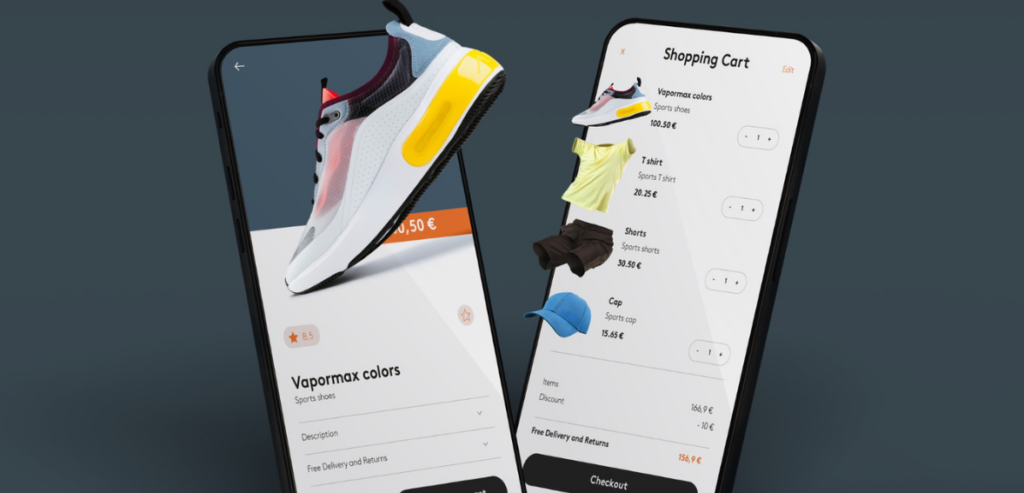
Clear visual hierarchy is essential. Product name, price, primary image, and purchase call to action should appear near the top of the page. Mobile product page optimization ensures that secondary information such as detailed descriptions or specifications remains accessible without overwhelming the user. Strong ecommerce mobile UX relies on responsive layouts that adapt gracefully across devices, maintaining consistency while enhancing usability on mobile screens.
Simplifying Product Descriptions for Mobile Reading
Lengthy and dense product descriptions can discourage mobile shoppers. On smaller screens, readability becomes critical, and users prefer clear and concise explanations that answer their main questions quickly. Simplifying content does not mean removing value but presenting it more effectively.
Mobile product page optimization involves structuring descriptions so that benefits are communicated early and clearly. Key features should be easy to spot, while detailed information can appear later for users who want to explore further. Ecommerce mobile UX improves when text is broken into readable sections that flow naturally during scrolling. A responsive approach ensures that content feels intentional rather than compressed or overwhelming.
Using High Quality Images Without Slowing Performance
Images play a major role in mobile shopping decisions. Since users cannot physically interact with products, visuals help build confidence and reduce uncertainty. However, large image files can negatively affect performance if not optimised correctly.
Responsive image techniques ensure that images scale appropriately for different screen sizes without sacrificing clarity. Mobile product page optimization balances visual quality with performance by using modern image formats and loading strategies. Ecommerce mobile UX benefits when images load smoothly and support zoom functionality without lag. Clear visuals enhance trust while efficient loading keeps users engaged rather than impatient.
Making Calls to Action Clear and Accessible
On mobile product pages, calls to action must be obvious and easy to tap. Poor placement or small buttons can frustrate users and reduce conversions. Mobile shoppers should never struggle to find the option to add an item to the cart or proceed to checkout.
Mobile product page optimization prioritises prominent and well spaced call to action buttons. Placement near the bottom of the screen works well since it aligns with natural thumb reach. Ecommerce mobile UX improves when responsive layouts ensure buttons remain visible even as users scroll. Clear and accessible calls to action remove friction and support confident purchase decisions.
Building Trust Through Mobile Friendly Content
Trust is a critical factor in mobile conversions, especially when users may be unfamiliar with a brand. Product pages need to reassure shoppers quickly through credibility signals that fit naturally into a mobile layout. Overloading the page with trust badges can be counterproductive if it adds clutter.
Mobile product page optimization integrates trust indicators such as reviews, ratings, and return policies in a clean and readable way. Ecommerce mobile UX benefits when reassurance is woven into the page flow rather than isolated at the bottom. Responsive placement of trust signals allows users to gain confidence without interrupting the buying journey, leading to higher conversion rates.
Improving Navigation and Scrolling Experience
Mobile navigation should feel intuitive and effortless. Complex menus or excessive scrolling can overwhelm users and lead to abandonment. Product pages should support smooth vertical scrolling while keeping important actions within easy reach.
Ecommerce mobile UX relies on predictable interactions that reduce cognitive load. Mobile product page optimization often includes features such as sticky headers or persistent call to action buttons that remain visible while scrolling. Responsive navigation ensures users can explore product details without losing orientation. When navigation feels seamless, users stay engaged longer and progress more confidently toward checkout.
Managing Product Variations on Mobile Screens
Products with multiple variations such as size, colour, or style can create challenges on mobile screens. If these options are not displayed clearly, users may struggle to make selections, leading to frustration or incorrect orders.
Mobile product page optimization ensures that variation selectors are easy to use and clearly labelled. Dropdowns, swatches, or buttons must be large enough to tap accurately. Ecommerce mobile UX improves when users can change options without reloading the page or losing context. Responsive handling of product variations helps shoppers customise purchases comfortably on smaller screens.
Reducing Distractions That Hurt Mobile Conversions
While promotional banners and popups may work on desktop, they can severely disrupt mobile experiences. Limited screen space means distractions feel more intrusive and make it harder for users to focus on the product.
Mobile product page optimization involves removing or minimising elements that do not contribute directly to conversion. Ecommerce mobile UX improves when the page stays focused on the product and purchasing action. Responsive design decisions should consider how each element affects clarity and flow. A cleaner product page reduces friction and keeps users engaged with the buying process.
Ensuring Checkout Readiness From Product Pages
Product pages should prepare users mentally and technically for checkout. Unexpected costs, unclear delivery information, or missing policies can cause last minute hesitation. Mobile shoppers prefer transparency upfront to avoid surprises later.
Mobile product page optimization includes displaying key checkout related information such as shipping options or delivery timelines in a mobile friendly way. Ecommerce mobile UX benefits when users feel informed before they tap the buy button. A responsive approach ensures that this information remains visible and readable without overwhelming the page. When product pages support checkout readiness, conversion rates improve naturally.
Leveraging Responsive Design for Consistency
Responsive design is essential for providing a consistent shopping experience across devices. However, consistency does not mean identical layouts. Instead, it means delivering the same value and functionality in a way that fits each screen size naturally.
Green lighting mobile product page optimization strategies that prioritise responsive performance ensures content adapts intelligently without breaking layout or usability. Ecommerce mobile UX improves when users enjoy familiar interactions regardless of device. A strong responsive approach reduces maintenance complexity while supporting high conversion rates across mobile, tablet, and desktop platforms.
Measuring Mobile Performance and User Behaviour
Optimizing mobile product pages is an ongoing process that requires regular measurement and refinement. Analytics tools provide insights into where users drop off, how long pages take to load, and which elements drive engagement.
Mobile product page optimization benefits from data driven improvements rather than assumptions. Ecommerce mobile UX evolves when businesses study scroll depth, tap behaviour, and conversion paths. Responsive testing across devices ensures pages perform as expected under different conditions. Continuous analysis allows brands to make informed adjustments that enhance mobile conversions over time.
Adapting to Changing Mobile Commerce Expectations
Mobile commerce continues to evolve as user expectations rise. Shoppers now expect personalisation, seamless navigation, and near instant performance. Product pages that fail to keep up risk becoming irrelevant in a competitive landscape.
Mobile product page optimization must adapt to new technologies and behaviours while maintaining simplicity. Ecommerce mobile UX improves when businesses stay attentive to user feedback and emerging trends. Responsive strategies allow brands to future proof product pages by staying flexible and scalable. Adapting proactively helps ensure conversions remain strong as mobile shopping habits continue to change.
Optimising Mobile Forms and Input Fields on Product Pages
Forms and input fields have a bigger influence on mobile product pages than many business owners recognize. Before the checkout process, customers might have to enter various details such as quantity, delivery locations, and custom details. For ineffective optimization of the product pages, the forms and input fields on the smaller screens might become very cumbersome, and it might lead to product abandonment. So, optimized forms of product pages on mobile devices need to be frictionless.
The input fields should be large and mobile-friendly so that they can be tapped easily. There should be proper space from each other to avoid errors. The default keyboards should be relevant to the input data, such as using numeric keyboards when inputting quantity or postal codes. Improvements to ecommerce mobile UX involve removing unwanted input fields and optimizing important ones. The use of auto-fill features also contributes to efficiency and speed. By using a responsive design, there is no compromise on layout and user experience on various devices. When the experience of filling out a form is improved, the user can solely focus on the purchase.
Using Social Proof Effectively on Mobile Product Pages
Social proof is also significant to the purchasing decision; this is more applicable to mobile shoppers since purchasing decisions are often impromptu. The reviews, ratings, etc., provide the customer with social proof that the product is sold and trusted by others too. However, social proof must be used in mobile design in an appropriate manner.
For mobile product pages, product page optimization involves the integration of social proof that naturally supports the decision. Using star ratings near the product title can help users quickly evaluate the credibility of the product. Using small highlights for reviews can give users the satisfaction needed prior to purchasing the products. Considering the mobile UX of ecommerce websites, allowing users to tap and read full reviews only if needed can be greatly helpful. Similarly, responsiveness can help the social proof elements remain nicely aligned. Hence, social proof can help product pages build trust by removing possible hesitations, thus driving more conversions from mobile traffic.
Supporting One Handed Navigation for Mobile Users
Many mobile shoppers tend to navigate and shop with their hands, most often their thumb. This, in turn, affects the optimization of the product page. Some sections, if too high or too low, might not offer the best interaction, hence causing consumer frustration and causing them to leave the site. Therefore, optimization of the product page for the mobile audience requires consideration of hand movement.
These key actions should fall within easy reach zones. The mobile UX of ecommerce websites improves when web pages minimize precision touch or excessive scrolling. Sticky items such as add to cart buttons can also be helpful in this regard. In responsive web design, such features must be usable across a variety of screen sizes or orientations. Product pages can be made more accessible to one-handed use, which can be helpful in creating a very intuitive experience and reducing physical friction.
Reducing Cognitive Load During Mobile Decision Making
Mobile shoppers often browse in distracted environments, juggling multiple tasks or interruptions. This makes reducing cognitive load essential for mobile conversions. When users are forced to process too much information at once, they are more likely to abandon the page. Effective mobile product page optimization simplifies decision making by guiding attention and removing unnecessary complexity.
Clear structure, consistent spacing, and predictable layout patterns help users understand information quickly. Ecommerce mobile UX improves when product details are presented in a logical flow that matches user expectations. Responsive design supports this by adapting content hierarchy without overwhelming the screen. By reducing the mental effort required to compare options, understand value, and take action, product pages help users feel confident and in control. Lower cognitive load leads to faster decisions, fewer hesitations, and stronger conversion performance on mobile devices.
Conclusion
Optimizing product pages for mobile shoppers without sacrificing conversions entails design considerations, speed, and user-centered decisions. It is now a main avenue of engagement rather than a supplementary aspect of the brand-consumer relationship. If product pages are created from a mobile perspective, they can actually be very useful for conversions rather than hindrances. Optimizing product pages for the mobile shopper can improve the overall efficacy of mobile UX in ecommerce websites, providing clarity, speed, and confidence on smaller interfaces and screens without sacrificing any of the above attributes, which is possible with a responsive design approach, allowing businesses to raise the bar in terms of consumer expectations.